
Getting started
Domains
When you first sign up for a partner account, you'll want to set up some domains for your clients to be able to access the management interface, as well as register their handsets with the service.
You can set up any domain you like, ensuring they're pointed to the following domains as CNAMEs as per the examples below (you don't have to use connect and sip subdomains, if you have a preference for a different name for one or both, just let us know):
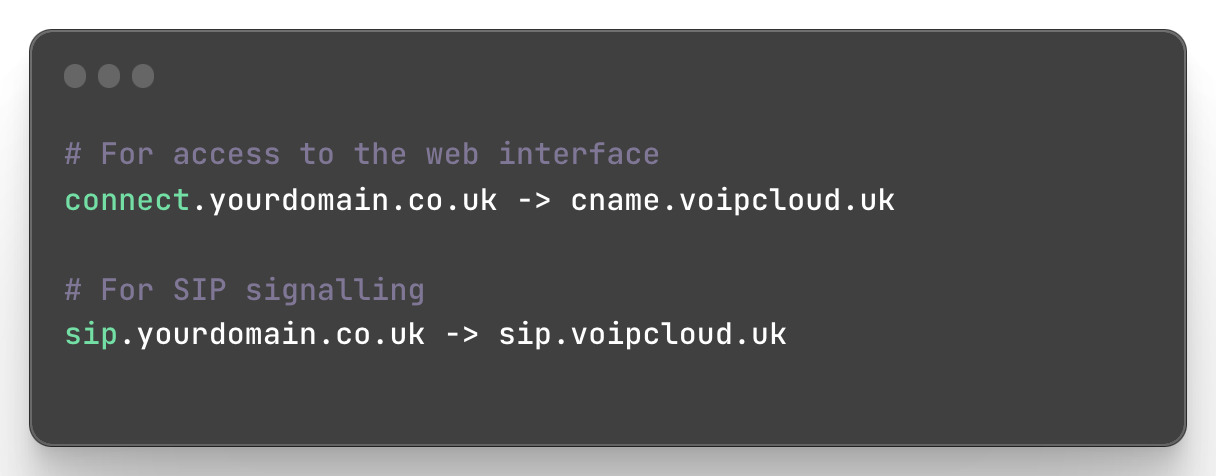
We'll also set up free SSL certificates for both domains using Let's Encrypt, which will automatically renew at the appropriate time.
Please note, if you're looking to update your branding and hostnames, you'll need to get in touch with the support team for assistance with setting up SSL certificates, and DNS for emails.
From time to time the phone system is required to send emails to your customers, these are sent whenever a voicemail or fax is received, or, if configured, when a unit approaches its credit limit.
To improve the deliverability of these emails we recommend that the following steps are implemented on your domain;
SPF Record
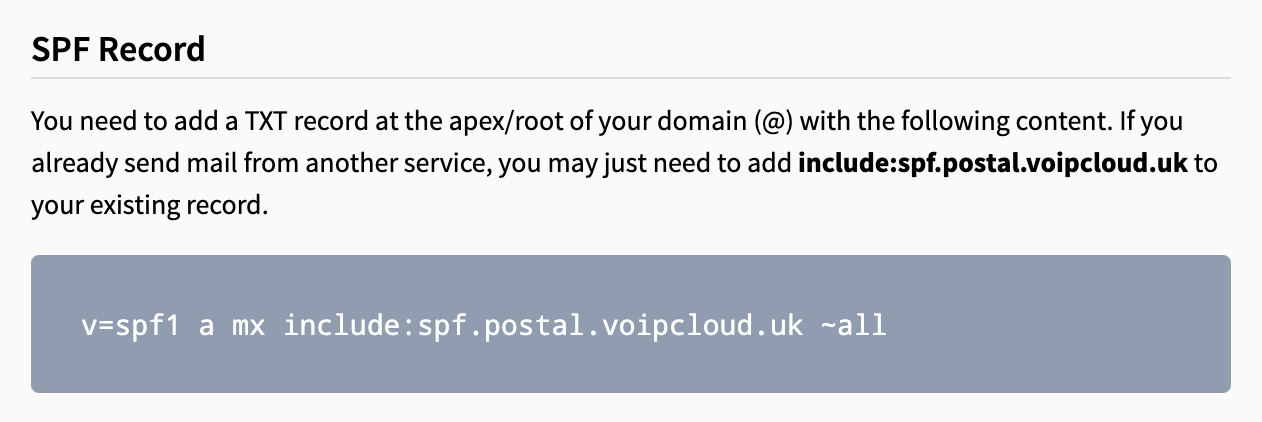
You need to add a TXT record at the apex/root of your domain (@) with the following content. If you already send mail from another service, you may just need to add the include part to your existing record.
DKIM Record
You need to add a new TXT record which we will provide to you once you've set up your domains.
Return Path
This is optional, but we recommend adding this to improve deliverability. You should add a CNAME record to point to the hostname below; we will confirm the domain you need to add with you after your domains are setup:

